

Last Updated: November 1, 2026
Quick Summary
A freezer inventory is a running list of what's stored in your freezer, where each item sits, and the date it went in. Update it whenever you unpack groceries or pull food out, and keep fields to item, date, and location to stay consistent.
- Record item, date frozen, and location for each package to start.
- Update the list during grocery unpacking, before items go in the freezer.
- Cross off or reduce quantities when you cook from frozen.
- Do a two-minute weekly review and a full clean-out each quarter.
- Label packages with the freezing date and use the oldest items first.
Table of Contents
- Why a Freezer Inventory Saves Food and Time
- Choosing a Tracking Method: Paper, Whiteboard, Notes App, or Spreadsheet
- How to Build a Freezer Inventory List That Stays Useful
- Freezer Inventory Printable Templates and Planner Inserts
- Using a Freezer Inventory App to Stay Current
- Freezer Food Storage Times and Labeling Basics
- Start Your Freezer Inventory Today With Rivet QR
- Frequently Asked Questions
Why a Freezer Inventory Saves Food and Time
Most people lose track of what's in the freezer. A forgotten roast sits behind the peas for months, and then it gets tossed. A simple freezer inventory can fix most of it.
A freezer inventory is a running list of what's stored, where it sits, and when it went in. It answers three questions fast: what do I have, where is it, and what should I use first.
- Less food waste from forgotten packages
- Fewer duplicate purchases
- Faster meal planning from what's already on hand
- Quicker searches when you open the freezer door
Keep it simple. You don't need perfect records. You need a list you'll actually check.
Choosing a Tracking Method: Paper, Whiteboard, Notes App, or Spreadsheet
Pick the method you'll actually keep using, not the one that looks best on day one. The right choice depends on three things: how many people touch the freezer, how often you shop, and whether you want to search your list from the store. Here's how the four common methods compare on those points.
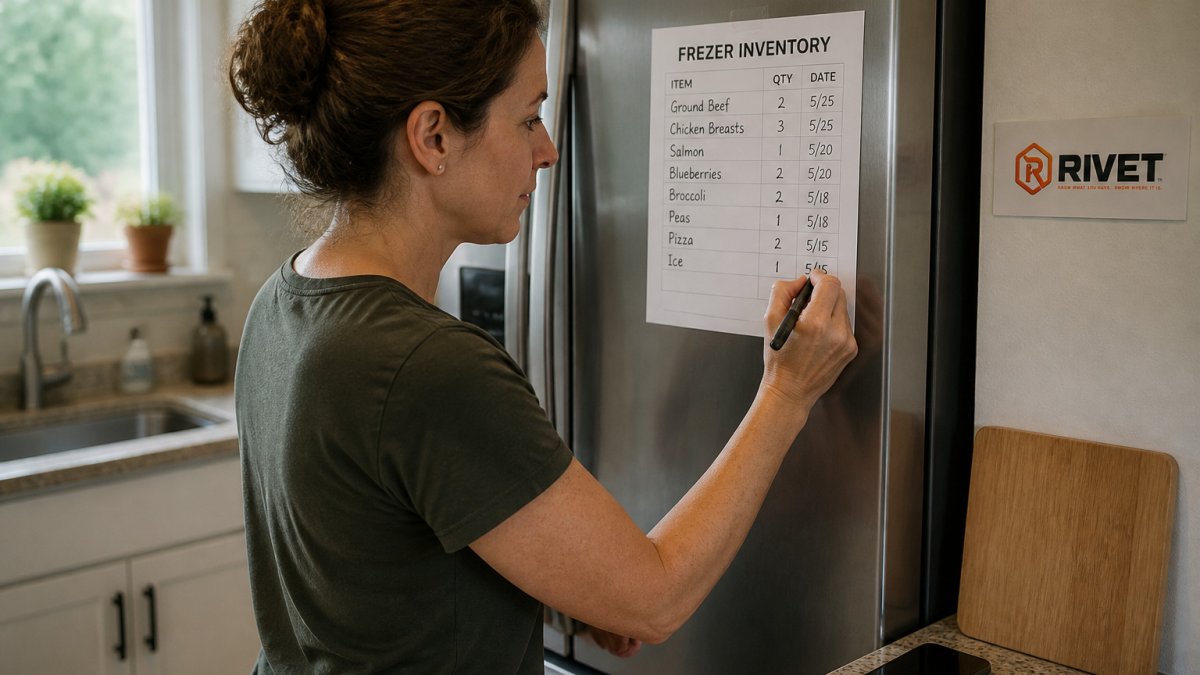
![A person in a kitchen jotting a freezer item on a printed inventory sheet taped to the freezer door, with a phone resting nearby]
- Paper and pencil: Cheapest and fastest to start. A printed chart on the freezer door works well for quick updates, but it only reflects what's written, if someone grabs the last bag of peas and doesn't cross it off, the list lies. Best for one- or two-person households with a consistent routine.
- Whiteboard: The most visible shared option. Anyone can erase an item as they use it, which makes it naturally self-correcting for households with kids or roommates. The trade-off: no dates, no quantities, and no history, so it's weak for bulk buys or long-term rotation.
- Notes app: Searchable and always in your pocket, which matters when you're standing in the grocery aisle deciding whether you need more chicken. The weakness is that shared access is clumsy, most people end up with one person's phone as the source of truth, and updates lag when that person isn't home.
- Spreadsheet: The strongest option for detailed tracking with dates, quantities, categories, and locations. A shared cloud spreadsheet solves the household-access problem because everyone edits the same file. The cost is friction: adding an item takes more taps than a whiteboard swipe, so it only works if you commit to updating it during grocery unpacking, not later.
A practical way to decide: try one method for two weeks and count how many times the list was wrong when you checked it. If accuracy is the problem, move toward a shared digital tool. If visibility is the problem, move toward a whiteboard or door-mounted paper chart. Many households mix methods, a whiteboard on the door for quick daily use, plus a spreadsheet or app for dated, searchable records.
Digital tools, briefly: beyond notes apps and spreadsheets, some households use inventory apps to speed up entry. To see how a dedicated app compares, read RIVET vs SnapFind: a free alternative for a shared home inventory. These cut the time per item but add setup effort, and they still depend on someone updating items when they're used. Paper, whiteboard, notes, and spreadsheet remain the four workhorses; treat apps as an upgrade once the routine is already solid.
The four common methods compare as follows on the points that matter most.
| Method | Best for | Key trade-off |
|---|---|---|
| Paper and pencil | One- or two-person households | List lies if items aren't crossed off |
| Whiteboard | Shared visibility with kids or roommates | No dates, quantities, or history |
| Notes app | Searching from the grocery aisle | Shared access is clumsy |
| Spreadsheet | Detailed tracking with dates and quantities | Adding items takes more taps |
How to Build a Freezer Inventory List That Stays Useful
A list only helps if it stays accurate. Start with a clean list and a clear format.
- Empty the freezer and group items by type: meat, vegetables, bread, prepared meals.
- Write each item, the date it went in, and its location (top drawer, back shelf, door).
- Note the quantity for anything you buy in bulk.
- Post the list where you'll see it, such as on the freezer door or in your phone.
Watch out: A long, detailed list is harder to keep current. Keep the fields to item, date, and location if you're just starting.
Freezer Inventory Printable Templates and Planner Inserts
A printable template saves setup time, but only if it's built for the way you'll actually update it. Most free freezer inventory printables online are just blank ruled lines, which is why they get abandoned by week three. A template that survives needs four columns and a place to write the update date.
What a useful printable should include:
- Item name, specific enough to identify it later ("chili, beef, 2 cups" beats "leftovers")
- Quantity, number of packages or servings, so you know when you're down to the last one
- Date frozen, the date the food went in, not the purchase date
- Location, shelf, drawer, bin, or zone, so you can find it without digging
- A review date at the top, the date you last checked the list against the freezer, so you know how stale it is
Planner inserts vs. door-mounted charts: Planner inserts work well if you already keep a binder for meal planning, because you can track freezer items next to your weekly menu and plan meals around what's already stored. A door-mounted chart works better for households that need the list visible at the moment of use. If you use both, keep the door chart as the working copy and the planner insert as the dated record.
A repeatable update routine that keeps the template accurate:
- At grocery unpacking, add every new item with name, quantity, date, and location before it goes in the freezer. This is the single most important update; skip it and the list never catches up.
- At meal prep, when you cook from frozen, cross off or reduce the quantity on the list as you pull the item out, not after the meal.
- At leftovers, when you freeze a portion of a cooked meal, add it as a new line with the date and a clear label like "soup, lentil, 2 servings."
- Weekly review, spend two minutes comparing the list to the freezer and correct anything that drifted. Mark the review date at the top.
- Quarterly clean-out, empty the freezer, group items by type, and rewrite the chart fresh. This is also the moment to check dates and rotate older items to the front.
Freezer zones and location tracking: divide the freezer into named zones, for example, top shelf for prepared meals, middle shelf for meat, bottom drawer for vegetables, door for small items, and write the zone name in the location column. Recording location is what turns a list into a search tool: instead of opening the door and digging, you read "chicken thighs, bottom drawer, left bin" and go straight to it. Label the bins or shelves themselves with the same zone names so the list and the freezer match.
Food safety and rotation: pair the template with first-in, first-out rotation. When you add a new package, move older items to the front and note the older date on the list so it's used first. For how long specific foods keep safely in the freezer, check USDA FoodKeeper guide to freezer storage times, and for safe handling advice see FDA guidance on safe food storage.
If you want to use QR codes for freezer bins, Rivet QR offers QR labels for storage bins. Optional QR labels are available, and you can also start without them.
Using a Freezer Inventory App to Stay Current
Apps make updates faster because your phone is always nearby. Look for one that lets you add items in seconds and search by name.
A freezer inventory app works best when you update it right away. Learn whether a freezer inventory app can work without physical labels: Can a Freezer Inventory App Work Without Labels?. Add items when you unpack groceries, and cross them off when you use them. A quick weekly check keeps the list honest.
Rivet QR is a free home inventory app that helps you remember what you own and where it's stored. You can use it for freezer contents alongside other storage. You can also search using your own words, so you don't have to remember exact labels.
Freezer Food Storage Times and Labeling Basics
Clear labels make the inventory easier to use. Write the item name and the date on every package before it goes in. This tells you what to use first.
- Label with a permanent marker or freezer tape
- Write the date you froze the food, not the date you bought it
- Store raw meat on lower shelves to prevent drips
- Use the oldest items first
For official guidance on how long different foods keep in the freezer, check USDA FoodKeeper guide to freezer storage times. Storage times vary by food, so use the official source for specific times.
For safe handling advice, see FDA guidance on safe food storage.
If you want to use QR codes for freezer bins, Rivet QR offers QR labels for storage bins. You can print your own, use compatible codes you already have, or buy ready-made labels.
Start Your Freezer Inventory Today With Rivet QR
Start small. Pick one method, list what's in the freezer, and update it each time you shop. A few minutes a week keeps waste down and meal planning easy.
If you want a faster setup, you can browse the RIVET starter pack of QR labels to start on freezer bins. Rivet QR's home page explains how the app works, and you can start for free.
Frequently Asked Questions
How do you keep track of food in your freezer?
Pick one place to record everything, such as a printed sheet on the freezer door, a whiteboard, or a notes app, and update it each time you put food in or take it out. Record the item, quantity, and date frozen. Cross items off as you use them so the list reflects what is actually there. A routine works better than a perfect system: a two-minute update after each grocery trip is usually enough to keep the list accurate over time.
What should a freezer inventory list include?
At minimum, include the food name, quantity, the date it went into the freezer, and its location, such as top drawer or back left shelf. Adding a use-by or best-by date and a short note about how it was prepared, like portion size or marinade, helps when planning meals. Keep it simple enough that you will actually update it, because a short accurate list is more useful than a detailed one that falls out of date.
Is a freezer inventory app better than a printable list?
It depends on how you shop and who uses the freezer. A printable list is free, easy to post on the freezer door, and needs no phone. A Rivet QR app lets you search your items by name or in your own words. If several people use the freezer or you want to find items when you are away from home, an app is usually the better fit.
